Alerts and Watch-outs: your 24/7 CFO
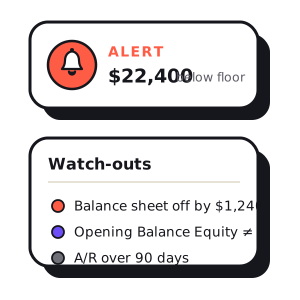
Your monthly report is a point-in-time read — a considered look back at a month that already closed. It's the most valuable thing Wauvel makes, and it's also, by design, a little late. A real CFO doesn't only show up at month-end. They keep half an eye on the numbers every day, and they tap you on the shoulder when something needs you now.
That's the job of two new features. Alerts watch the numbers you care about and ping you the moment one crosses a line you drew. Watch-outs quietly review your books each day for the small bookkeeping mistakes that quietly break your reports. Both run on your live QuickBooks numbers, both run automatically, and neither costs a report or a credit to use.
Two jobs a CFO does between reports
Think of the gap between monthly reports as the part of the job nobody sees. A good finance partner spends it doing two things: keeping watch on the figures that decide whether you can make payroll, and keeping the books clean enough that the numbers can be trusted. Alerts and Watch-outs are those two habits, turned into software that never takes a day off.
Alerts: a line you draw, watched every day
An alert is a threshold you set once, checked against your live numbers every morning. Cross the line and you get a short, plain-English ping — with the actual figure, not just “something happened.” There are five things you can watch:
- Low cash. Your cash balance drops under a floor you're comfortable with. We even seed a starter floor at roughly one month of your expenses, so it's useful on day one.
- Low runway. Months of cash left at your current spend rate falls under a floor — the earliest warning of a cash crunch, well before the balance itself looks scary.
- A large transaction. A single charge above an amount you set posts to the bank — so a big or unexpected payment gets a second pair of eyes the day it lands.
- Overdue receivables. Money customers owe you sits past due — nudge collections sooner, before it ages into the “maybe never” column.
- Overdue payables. Bills you owe go past due — catch them before a late payment strains a vendor relationship.
Every alert reads a real figure and names the culprit — “$18,400 in receivables is over 30 days late — largest is Northwind Co.” When an alert fires it goes quiet while the same condition persists, then reminds you about a week later, so a payable that's been overdue for three weeks pings once and then weekly, not every single morning. Clear the problem and the counter resets — the next occurrence is treated as genuinely new.
Where the ping lands is up to you: email, or straight into the same Slack channel that already gets your reports and daily digests. It arrives where you already work, so you don't have to remember to go look.
Watch-outs: a books review that runs itself
Alerts watch the numbers. Watch-outs watch the bookkeeping — the setup mistakes and stray entries that make a report subtly wrong long before anyone notices. It's the pass a good bookkeeper does before they trust a set of books, run for you every day against your live QuickBooks data.
Every finding is deterministic — real arithmetic on your real accounts, not an AI's hunch — and every check is materiality-gated, so a $4 rounding stub on a business your size never trips. Findings are ranked by how much they matter (fix soon, worth a look, keep an eye on it), and each one comes with a plain read of what it usually means, so you can hand it straight to your bookkeeper.
Free · no account · no card
Get your 2027 budget built from your QuickBooks — P&L, balance sheet and cash flow, in Excel.
What Watch-outs looks for
There's no black box here — this is the full list of what we scan for, every day:
- The balance sheet doesn't balance. Assets should equal liabilities plus equity; a gap almost always means a journal entry hit only one side.
- A bank account is negative in the books. Usually a missed deposit or a payment entered twice — not a real overdraft.
- The books don't tie to the bank. We compare your book cash to the live balance at your connected bank; a large or persistent gap points to unreconciled activity.
- Opening Balance Equity still has a balance. The single most common QuickBooks cleanup item — this setup account should be zero once your books are established.
- Undeposited Funds is holding money. Payments recorded as received but never matched to a deposit pile up here.
- Uncategorized / Ask-My-Accountant balances. Catch-all accounts carrying a balance are transactions nobody has coded yet.
- Inventory is negative. More was recorded as sold than received — usually bills entered after the sale.
- A customer shows a credit balance. Typically an unapplied payment or a credit memo never applied to an invoice.
- A vendor shows a negative balance. Usually a prepayment or vendor credit never applied to a bill.
- Stale receivables. A large share of A/R sitting past 90 days — some of it may be uncollectible and worth writing off.
Why deterministic, not AI
Both features deliberately leave the AI out. An alert fires because a number genuinely crossed a line you set; a watch-out flags because an account genuinely carries a balance it shouldn't. There's no model in the loop deciding what's “probably” wrong — just arithmetic on your real numbers. That's what lets us run them every day, with no limit on how often, and it's why you can trust a ping the moment it arrives instead of second-guessing it.
How to turn them on
If your QuickBooks is connected, both are a couple of clicks away:
- Open Alerts, pick what to watch, set your line, and choose where the ping goes. We seed a sensible low-cash alert to start.
- Open Watch-outs to see today's findings — nothing to configure, it just runs.
Alerts and Watch-outs are both included in Wauvel CFO, alongside your monthly reports and Slack/Teams delivery. See the plan for the full breakdown.
Need your financials for a lender, a buyer or your accountant? Get the free financials pack →
See what an AI CFO says about your own numbers.
$99/mo, everything included. Free for 14 days, no card.