Ask your finances a question — right in Slack
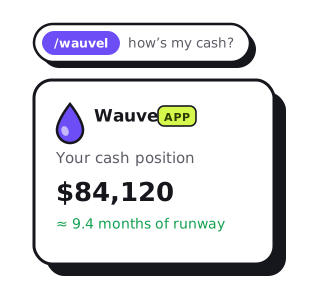
We already post your reports and daily digests to Slack so the numbers come to you. Now the channel talks back. Type /wauvel followed by a question and your AI CFO answers from your live QuickBooks numbers — in seconds, without opening the app.
It's the same fractional-CFO brain that writes your monthly review, pointed at your up-to-the-minute figures. Ask it what's in the bank, who your biggest customers are, or what next quarter looks like if you hire — and get a straight, plain-English answer grounded only in real arithmetic, never a guess.
Two ways to use it
Connecting Slack gives you both a push and a pull — the numbers arrive on a schedule, and you can interrupt with a question any time:
- The daily report (push). A short morning or Monday pulse of your live numbers — cash on hand and the change since yesterday, money in and out, A/R and A/P aging, runway — plus report-ready pings and cash alerts when something crosses a line you set. More on delivery here.
- Ask a question (pull). Fire off
/wauvel <your question>and get an answer back in the channel — only you see it. Behind the scenes it can look up a specific month, rank your top customers or expenses, pull your real bank balance and runway, project the next few months, or export a spreadsheet.
A few commands to try
There's no syntax to memorize — ask the way you'd ask a person. These are just to show the range:
/wauvel how much cash do we have, and how long will it last?— your real bank balance, recent burn, and an honest runway estimate./wauvel what was our net income in June?— pulls that specific month's figures, not a year-to-date blur./wauvel who are our top 10 customers this year?— a clean ranked table, with an Excel copy dropped in the channel./wauvel what were our biggest expenses last quarter?— your largest cost categories for the period./wauvel forecast the next 6 months if we hire 2 people at $170k— a month-by-month projection under that what-if./wauvel send me the trended financials from Jan 2025 to Jun 2026— P&L, balance sheet, and cash flow by month, as an .xlsx./wauvel who owes me the most right now?— your open A/R, worst offenders first.
How to turn it on
It takes about thirty seconds and never touches your Slack password. From your Wauvel account:
- Open Integrations and click Add to Slack, then pick the workspace and channel.
- Make sure a QuickBooks company is connected — that's where the answers come from.
- In any channel, type
/wauveland your question. The reply is private to you, so you can ask in a shared channel without broadcasting your books.
Asking your AI CFO in Slack is included in Wauvel CFO — one plan, everything included — and so is delivery (digests, pings, alerts). See the plan for the full breakdown.
Free · no account · no card
Get your 2027 budget built from your QuickBooks — P&L, balance sheet and cash flow, in Excel.
What it can and can't see
The connection is deliberately narrow, and the trust stance is simple:
- It only reads what you send it. Wauvel sees the text after
/wauvel— nothing else. No message history, no other channels, no DMs. - Every figure is real. Answers are grounded only in numbers pulled live from QuickBooks and computed by actual arithmetic. If the data can't answer, it says so instead of guessing.
- Yours to cut. Disconnect from the Integrations page anytime, or remove the app from your Slack workspace directly.
Where this goes next
Slack is becoming the fastest surface for Wauvel, and we're leaning in. On the roadmap:
- Follow-up threads — keep the conversation going in a thread instead of one-shot questions.
- Scheduled questions — have a standing ask (“every Monday, our top 5 customers this month”) post itself automatically.
- Deeper drill-downs — from a headline number straight into the transactions behind it.
- More channels — the same AI CFO in Microsoft Teams, so the whole team can ask wherever they work.
/wauvel how's my cash looking?Need your financials for a lender, a buyer or your accountant? Get the free financials pack →
See what an AI CFO says about your own numbers.
$99/mo, everything included. Free for 14 days, no card.