Cash vs. accrual accounting: why one QuickBooks toggle changes your profit
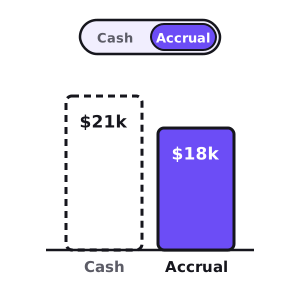
Open your Profit & Loss in QuickBooks, look near the top, and you'll see a small toggle: Cash or Accrual. Flip it, and your profit for the month changes — sometimes by a little, sometimes by a lot. Nothing about the business changed. You just asked QuickBooks a different question.
That toggle trips up more small-business owners than almost anything else in their books, because it's never obvious which number is "right." The short answer: they're both right, they just measure different things. One tells you what landed in the bank. The other tells you what the business actually earned. Knowing which is which — and which to run your company on — is the difference between reading your business and reading your bank feed.
What's the actual difference?
The whole distinction comes down to timing: when a sale or a cost shows up on your P&L.
- Cash basis records revenue when the money arrives and an expense when the money leaves. Simple and literal: if cash didn't move, nothing happened.
- Accrual basis records revenue when you earn it — when you deliver the work or ship the product — and an expense when you incur it, regardless of when the cash actually changes hands.
Under cash basis, invoicing a customer does nothing to your P&L; only their payment does. Under accrual, the moment you deliver the work it's revenue, even if the invoice won't be paid for 45 days. Same events, recorded on different dates — and when a month closes, those dates are exactly what decide which side of the line a sale or a bill falls on.
Cash vs. accrual on the same month
Here's an ordinary June for a small services business. You delivered and invoiced $40,000 of work, but collected only $25,000 of it in June (the rest lands in July). A customer also paid a $10,000 deposit in June for a project you'll do in July. On the cost side, you racked up $22,000 of materials and labor used in June, but only paid $14,000 of those bills before month-end.
Cash basis · June
$21,000profit
What hit the bank
Accrual basis · June
$18,000profit
What you actually earned
The gap
$3,000
Pure timing — same month
| June | Cash basis | Accrual basis |
|---|---|---|
| Revenue | $35,000 | $40,000 |
| Expenses | −$14,000 | −$22,000 |
| Net profit | $21,000 | $18,000 |
Cash basis makes June look $3,000 better — not because the business did better, but because a customer deposit came in early and some bills went out late. Next month it flips: July has to recognize the $15,000 you collect on June's work and pay the $8,000 of June bills, so cash-basis July looks worse than it really was. The timing noise never disappears; it just sloshes from one month to the next. Accrual quietly nets it out where it belongs.
Why accrual tells you how the business is really doing
Accrual accounting runs on the matching principle: revenue is booked in the period it's earned, and the costs that created it are booked in that same period. That's what makes a monthly P&L comparable — each month reflects the work done in that month, not the accident of when checks cleared. A margin you can trust, a trend that's a real trend, a budget you can hold the month against: all of it depends on revenue and cost sitting in the right period.
It's also the language everyone outside your business reads in. Accrual is what GAAP requires, what a lender underwrites on, and what a buyer diligences. And only accrual gives you an A/R and A/P picture at all — cash basis has no concept of "owed to you" or "owed by you," because nothing exists until it's paid. If you want to know who owes you money, you're asking an accrual question.
Why cash basis still has its place
None of that makes cash basis wrong — it makes it a different tool. Its virtues are real: it's dead simple, it needs no judgment calls about when something was "earned," and it maps directly to the one thing that actually keeps the lights on — money in the bank. Plenty of small businesses also file their taxes on a cash basis, because it lets them time income and deductions around when cash moves.
The catch is that cash basis hides timing, and timing is where small businesses get hurt. A month can look flush because a big deposit landed and you haven't paid the bills behind it yet — the classic setup for feeling rich right before a wave of payables hits. That's the exact gap behind being profitable but broke, read from the other direction.
Free · no account · no card
Get your 2027 budget built from your QuickBooks — P&L, balance sheet and cash flow, in Excel.
The trap: QuickBooks lets you flip the toggle
Under the hood, QuickBooks records everything on accrual — invoices create revenue and receivables, bills create expenses and payables. "Cash basis" is a reporting conversion: when you flip the toggle, QBO recomputes the report as if only paid invoices and paid bills counted. Same underlying data, filtered two ways.
Two things surprise people here. First, the basis is set per report — your P&L can be on accrual while a saved copy someone else opens is on cash, and the two won't match. Always check the toggle before you trust a number or send it on. Second, if you never actually use invoices and bills — if you just categorize deposits and payments straight from the bank feed — then cash and accrual look identical, because you've given QuickBooks no "earned but unpaid" events to tell them apart. That feels tidy, but it means you have no A/R or A/P visibility at all.
Which basis should you run your business on?
You mostly don't have to choose — you use each for what it's good at. Keep your books on accrual so every report tells the truth about the month. Let your accountant set your tax basis (often cash for smaller businesses — that's a filing decision, not a bookkeeping one). And read your liquidity off a forward cash view, not off a cash-basis P&L.
That last piece matters: a cash-basis P&L is a backward-looking mash of earnings and timing that answers neither question cleanly. When you want to know "can I make payroll and rent over the next quarter," the right tool is a 13-week cash flow forecast — accrual books for the true picture of performance, a cash forecast for the picture of the bank account.
How to check and set your basis in QuickBooks
Your default lives in Account and Settings → Advanced → Accounting method; set it to Accrual so new reports open there. On any individual report, the Cash / Accrual switch (or Customize → Accounting method) flips just that report, which is handy when your accountant asks for a cash-basis P&L at tax time. Whichever basis a report is on, the books underneath it are only as good as your reconciling — so the habits in keeping your QuickBooks clean come first. A basis toggle can't fix an unreconciled account.
Once the basis is settled and the books are clean, you can finally read your income statement like a CFO — and know you're reading the business, not an artifact of when the money happened to move.
Need your financials for a lender, a buyer or your accountant? Get the free financials pack →
See what an AI CFO says about your own numbers.
$99/mo, everything included. Free for 14 days, no card.