Financial modeling best practices: building a model that doesn't break
A financial model is a tool for making a decision, not a monument to your spreadsheet skills. And models almost never fail on the math — they fail on structure, on trust, and on rot. The forecast that falls apart the week after you build it usually had a perfect calculation buried in a layout that nobody — including its author a month later — could follow. These are the practices that separate a model you'd put in front of a board from a spreadsheet nobody dares touch.
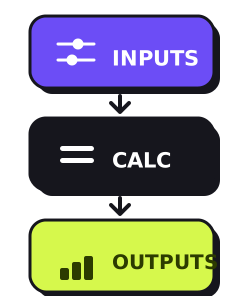
Separate the inputs, the math, and the outputs
The single highest-leverage habit in modeling. Three layers: an assumptions area where every number you can change lives; a calculation engine that references those inputs and never contains a typed-in number; and clean outputs built for whoever is reading. The old finance convention — inputs in blue, formulas in black — exists for exactly one reason: anyone who opens the file can see at a glance what's an assumption and what's derived. A number hardcoded inside a formula three tabs deep is a landmine, and you've already forgotten where you buried it.
=C2 * C3| A | B | C | D | |
|---|---|---|---|---|
| 1 | ASSUMPTIONS | |||
| 2 | Units sold | 1,000 | 1,050 | 1,103 |
| 3 | Price | $42 | $42 | $42 |
| 4 | ||||
| 5 | CALCULATION | |||
| 6 | Revenue | 42,000 | 44,100 | 46,326 |
Drive everything from assumptions you can defend
A number typed straight into the revenue line is a guess wearing a suit. Revenue is units times price; headcount cost is heads times fully-loaded salary; the model should compute it from drivers you can point a board member to and say where each one came from. Keep the assumptions few and explicit — a model with forty knobs isn't more accurate, it's just harder to trust. The credibility of a model is exactly the credibility of its inputs, and nothing else.
One formula per row, copied clean across
In a well-built model you should be able to click any cell in a row and find the same formula as the cell beside it — written once in the first period, filled across. Consistency is a feature: it's what lets a reviewer check one cell and trust the whole row. The moment period three has a different formula than period two — a one-off adjustment typed right in — you've created the exact hiding place where modeling errors live and breed.
Time runs left to right, one period per column
Set the model up so every column is a period and every period is the same length — all months, or all quarters, never a mix. Build the header row with EOMONTH so the dates are real and roll correctly. It sounds trivial; it's the backbone. A consistent time axis is what makes a formula fillable across, a chart trustworthy, and two models comparable. Mixing monthly and quarterly columns in one sheet is how a "small" inconsistency becomes a wrong number on a board slide.
Build the checks in
Every serious model has rows whose only job is to be zero. The balance-sheet check: assets minus liabilities minus equity should equal zero every period, or your model doesn't balance and you need to know this second. The cash tie: the ending cash on your cash-flow statement must equal the cash line on your balance sheet — when they diverge, something is leaking. Put these at the top where you can't miss them and flag them red the instant they break. A check row isn't paranoia; it's the difference between catching the error yourself and having a lender catch it for you.
=B1 - B2| A | B | C | D | |
|---|---|---|---|---|
| 1 | Total assets | 210,000 | 214,000 | 219,500 |
| 2 | Liabilities + equity | 210,000 | 214,000 | 219,500 |
| 3 | Check (must be 0) | 0 | 0 | 0 |
Free · no account · no card
Get your 2027 budget built from your QuickBooks — P&L, balance sheet and cash flow, in Excel.
Make scenarios a switch, not three copies of the file
The wrong way to handle base / upside / downside is "Save As" three times — now you have three files quietly drifting apart, and a fix in one never reaches the others. The right way is a single input cell — a 1, 2, or 3 — that a CHOOSE or a lookup reads to pull the matching set of assumptions. One model, one switch, three answers, zero divergence. It also forces you to be honest about what actually differs between the cases, which is usually fewer levers than you'd think.
=CHOOSE(B1, 5%, 8%, 2%)| A | B | |
|---|---|---|
| 1 | Scenario | 2 |
| 2 | 1 base · 2 upside · 3 down | |
| 3 | ||
| 4 | Growth rate applied | 8.0% |
Build it for the reader, not just for you
A model only one person can operate is a liability, not an asset. Label every row, carry the units in the row title ("Revenue, $000s"), keep a notes column for the "why" behind an assumption, and put a short cover tab that says what the model is for and what it assumes. The test is simple: could your banker, or you in six months, open this cold and follow it without a phone call? If it needs you in the room to explain it, it isn't finished.
Sanity-check against reality
When the math is done, stop and ask whether the output could actually happen. A distribution business forecasting 55% net margins has a typo, not a strategy. The sharpest single check is the seam: line up the first forecast period against the last actual month and look at the join — revenue, margin, headcount. A cliff or a leap at that boundary with no reason behind it means your assumptions don't connect to the business you actually run. A model that doesn't tie to reality at the seam won't tie to it anywhere.
Keep it as simple as the decision allows
Granularity has a cost, and it's paid in fragility and lost hours. Before you model something line by line, ask whether that detail changes the decision. Modeling every SKU to decide whether you can afford one hire is a cathedral built to answer a yes-or-no question. Model the handful of drivers that actually move the answer, at the lowest detail that still moves it, and stop. A model you can hold in your head is one you'll actually keep current — and a current rough model beats a precise stale one every single time.
Date it, version it, protect it
Models rot the day you stop touching them. Stamp the file with a date and the as-of of its actuals, so nobody mistakes last quarter's forecast for this one. Keep the old versions instead of overwriting — when someone asks "what changed since the last board meeting," you'll want both side by side. And lock the calculation cells so a hurried paste can't quietly overwrite a formula with a value, which is the single most common way a working model silently breaks.
Need your financials for a lender, a buyer or your accountant? Get the free financials pack →
See what an AI CFO says about your own numbers.
$99/mo, everything included. Free for 14 days, no card.
Prefer to run the numbers yourself? Try the free Pro Forma Projection (3-Statement Model) — it’s free.